
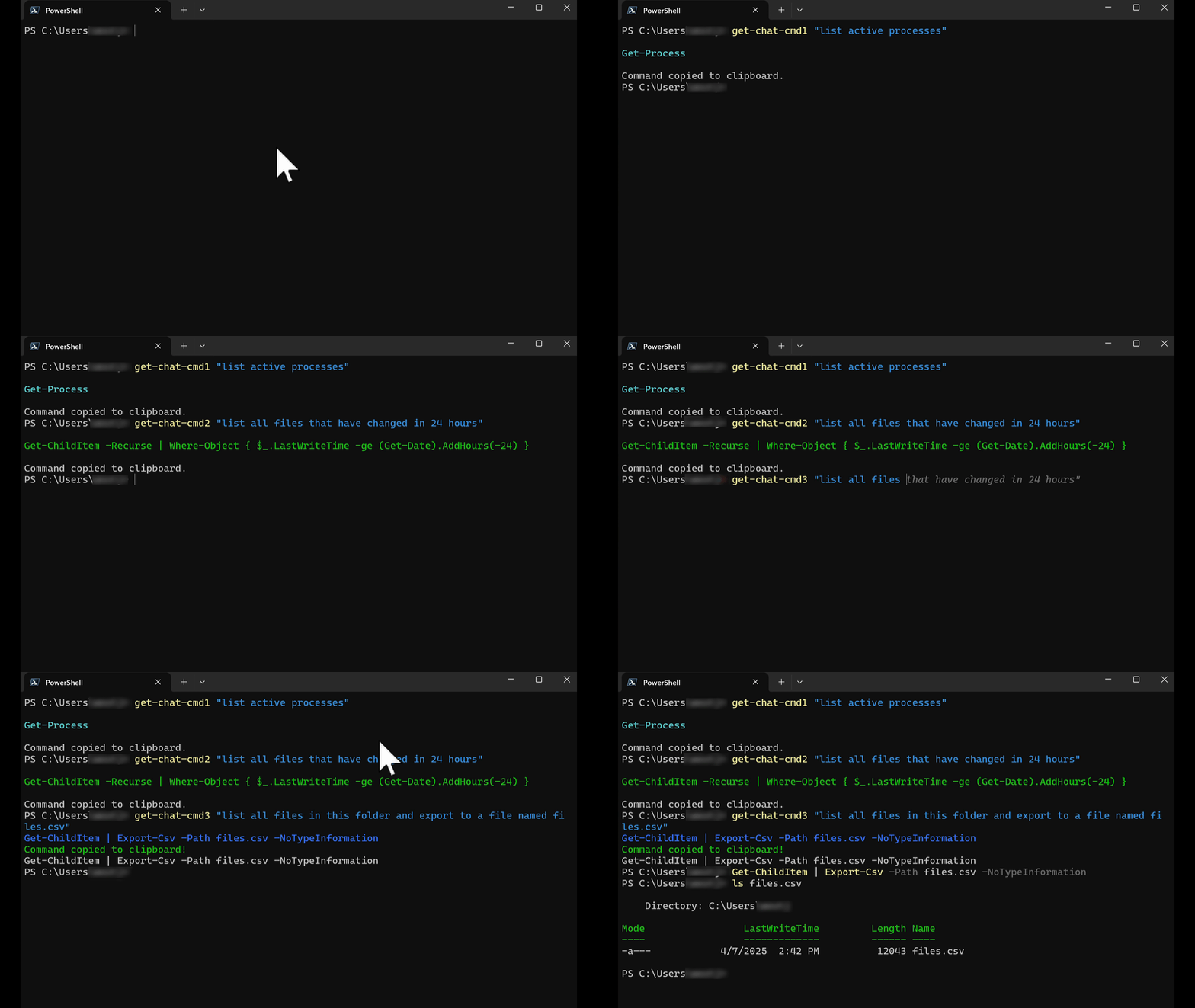
The repo contains a script (ai_powershell_commands.ps1) with my PowerShell functions for: generating PS commands from natural language using API calls to popular AI models, from within a PS session. Generated PS commands are output to console for evaluation, and copied to the clipboard. In the gif animation above I am asking 3 popular AI models for code snippets, using basic plain-English requests. Requests should be short and goal/outcome-oriented. These PS functions are written for PowerShell Core on Windows, Linux/WSL2, or MacOS (they may work in 5.1, untested).
I also maintain a variation of this same project for Bash (tested in Ubuntu and MacOS) which can be found here.
- Multiple AI Providers: My PS Functions use OpenRouter, OpenAI, Anthropic, and locally-hosted models.
- Natural Language Input: Describe the command you need in plain English.
- Clipboard Integration: Automatically copies the generated command to your clipboard.
- Multi-platform: Coded for PowerShell Core 7.5+, so it supports Windows, Linux, and MacOS (anywhere PS Core can deploy).
get-chat-cmd1: Uses OpenRouter's API with the "deepseek/deepseek/deepseek-chat-v3-0324:free" modelget-chat-cmd2: Uses OpenAI's API with the "gpt-4o-mini" modelget-chat-cmd3: Uses Anthropic's API with the "claude-3-7-sonnet-20250219" modelget-chat-local: Optional function for calls to locally-hosted Chat models (only tested with LM Studio)
NOTE: you must have your own API keys with all 3 AI providers to use the 3 main functions in ai_powershell_commands.ps1, as-written. If you are new to using API calls in PowerShell, info on obtaining API keys is below. You can also choose to only use a single function with a preferred AI provider or your own locally-hosted Chat model (via get-chat-local func which supports LM Studio and Ollama).
If you do not know how to locally-host your own Chat models and don't like the idea of giving "big AI" your money: might I suggest Openrouter.ai which is a fantastic gateway for many different free and paid models, and their pricing for "big AI models" is usually resonable.
These functions are intended for use in PowerShell Core 7.5+ (they may work in 5.1, haven't tested). Engineers & Vibe-Coders listen-up: see disclaimer below or license-agreement. This code is NOT tested in, or intended for, any prod environment.
-
Edit
ai_powershell_commands.ps1to replace:
—YOUR_OPENROUTER_API_KEYwith your actual OpenRouter API key
—YOUR_OPENAI_API_KEYwith your actual OpenAI API key
—YOUR_ANTHROPIC_API_API_KEYwith your actual Anthropoic API keyNote: If you primarily only use, say, Openrouter.ai as your API gateway: the OpenAI and Anthropic models can be called through "openrouter/model-name" as well. You'd simply comment-out the "
get-chat-cmd2/3" functions accordingly, and copy/use "get-chat-cmd1" for other Openrouter-proxied models. See this link for Openrouter models available. No API key is required for the optional "get-chat-local" function but your locally-hosted model must be accepting API requests. -
Import the functions into your current PowerShell session:
. C:\Users\username\Desktop\ai_powershell_commands.ps1Simply call either function with your plain English request:
# Using OpenRouter (deepseek/deepseek-chat-v3-0324:free)
get-chat-cmd1 "List all running processes sorted by memory usage"

# Using OpenAI (gpt-4o-mini)
get-chat-cmd2 "Find files modified in the last 24 hours"

# Using Anthropic (claude-3-7-sonnet-20250219)
get-chat-cmd3 "List all running processes"
These functions will:
- Make an API call to the appropriate service
- Display the resulting PowerShell command in colored text (without executing any code)
- Copy the command to your clipboard for easy use
get-chat-cmd2 "Find all .csv files created in the past 12 hours" # directs request to ChatGPT 4o and returns:
Get-ChildItem -Path . -Filter *.csv | Where-Object { $_.CreationTime -ge (Get-Date).AddHours(-12) }
get-chat-cmd3 "return the current time in UTC format" # directs request to Claude 3.7 and returns:
Get-Date -UFormat "%Y-%m-%d %H:%M:%S UTC"
If using the optional get-chat-local function (to interact with a locally-running LLM), you have use additional parameters:
get-chat-local "List all processes using more than 100MB of memory"get-chat-local -prompt "Find all .log files modified in the last 24 hours" -endpoint "http://localhost:8080/v1/chat/completions"Specify model name and adjust temperature ( "temperature" refers to a parameter that controls the randomness / predictability of the model's output)
get-chat-local -prompt "Create a script to backup my Documents folder" -model "llama3-8b" -temperature 0.2To make these functions available in all your PowerShell sessions, add the contents of ai_powershell_commands.ps1 to your PowerShell profile:
- Open your PowerShell profile in a text editor:
notepad $PROFILE- Copy and paste the contents of
ai_powershell_commands.ps1into your profile - Save the file and restart PowerShell
Alternatively, you can add this line to your PowerShell profile to source the functions file:
. "C:\Users\username\Desktop\ai_powershell_commands.ps1"Remember you will need at least one API Key to query one of 3 popular LLMs!
Also you can rename the functions however you'd like (I think "get-ai-cmd" was better but I am too lazy to rename everything 😂).
You can create accounts and obtain API keys inexpensively from these links:
https://openrouter.ai/keys
https://platform.openai.com/api-keys
https://console.anthropic.com/settings/keys
The functions provided in this repository are intended to assist in generating PowerShell commands through AI models in a test environment only and they are not intended for use in any production scenario. Users are responsible for reviewing and understanding the commands generated before execution. The author assumes zero liability for unintended consequences resulting from the use or misuse of these functions, including but not limited to poor-prompting which might create undesired command outputs. Additionally, the author is not responsible for any API usage charges incurred while using these functions. Users should monitor their API usage to avoid unexpected costs.
This project is licensed under the MIT License:
MIT License
Copyright (c) 2025 Julian West
Permission is hereby granted, free of charge, to any person obtaining a copy of this software and associated documentation files (the “Software”), to deal in the Software without restriction, including without limitation the rights to use, copy, modify, merge, publish, distribute, sublicense, and/or sell copies of the Software, and to permit persons to whom the Software is furnished to do so, subject to the following conditions:
The above copyright notice and this permission notice shall be included in all copies or substantial portions of the Software.
THE SOFTWARE IS PROVIDED “AS IS”, WITHOUT WARRANTY OF ANY KIND, EXPRESS OR IMPLIED, INCLUDING BUT NOT LIMITED TO THE WARRANTIES OF MERCHANTABILITY, FITNESS FOR A PARTICULAR PURPOSE AND NONINFRINGEMENT. IN NO EVENT SHALL THE AUTHORS OR COPYRIGHT HOLDERS BE LIABLE FOR ANY CLAIM, DAMAGES OR OTHER LIABILITY, WHETHER IN AN ACTION OF CONTRACT, TORT OR OTHERWISE, ARISING FROM, OUT OF OR IN CONNECTION WITH THE SOFTWARE OR THE USE OR OTHER DEALINGS IN THE SOFTWARE.
For more details, refer to the MIT License. oai_citation_attribution:0‡Wikipedia